Run Qwen3.8-Flash-Next 125B on a Gaming PC [Strata 2026]
Strata is a free one-click installer that runs the 125-billion-parameter Qwen3.8-Flash-Next model on a single 12GB gaming GPU. Here's the MoE trick, the RAM-tier guide, and real RTX 5070 and RX 9070 XT numbers.


Strata is a free, open-source installer that runs Qwen3.8-Flash-Next, a 125-billion-parameter AI model, on a single consumer gaming GPU with 12GB of VRAM. The developer, who goes by Niko1221, built it to handle the whole setup in one click on Windows or Linux.
A year ago, a model this size meant renting a data-center server. Using Strata to run Qwen3.8-Flash-Next kills that assumption. And with a same-day hotfix landing on October 12, 2026, the project moves fast enough that week-old tutorials already break on you.
Key takeaways
- Qwen3.8-Flash-Next carries 125 billion parameters but fires only 10 of its 512 experts per token. That is the entire reason it runs on a 12GB card instead of a server rack.

- On an RTX 5070 (12GB), Strata's smallest quant generates 94 tokens per second. An RX 9070 XT hits 60 on the same quant.
- Strata is free and MIT-licensed. It needs 32GB of system RAM minimum, 64GB to run every model size, and roughly 70-80GB of free disk.
- On Linux, AMD cards need no ROCm install at all. On Windows they only want a current Adrenalin driver.
- The first launch freezes your mouse for minutes while Strata loads 35-55GB into RAM. That is expected, not a crash.
What is Strata?
Strata is a local inference engine and one-click installer from a developer who goes by Niko1221. The pitch on the repo is blunt: run a 125-billion-parameter AI model on your own gaming PC, NVIDIA or AMD, Windows or Linux, free and open source. It ships under an MIT license. As of this writing the GitHub project sits at 22.6k stars and 2.2k forks, with 1,892 commits and a very live queue of 394 open issues and 440 open pull requests.
What it actually does: the installer sets up Python 3.12 in a private virtual environment, pulls the CUDA libraries, downloads your chosen model size, and exposes an OpenAI- and Anthropic-compatible API on localhost. If you have ever wired a local model into an app that expects one of those APIs, it drops in without changes. It even takes optional image input, because the underlying model is vision-capable.
A 125-billion-parameter model that only wakes 10 of its 512 experts per word is the whole trick. Sparsity, not magic.
The pace is the part most coverage misses. Strata rewrote its entire git history on October 6, 2026, which quietly broke git pull for anyone who cloned before that date, then shipped hotfix v0.1.43.1 on October 12. This is the trend writers like Simon Willison have been documenting for two years. Open weights that needed a server last year now run at home, and the tooling churns weekly. Treat any guide, including this one, as a snapshot, and check the live docs for the newest quirks.
What is Qwen3.8-Flash-Next, and how does a 125B MoE model fit on a gaming GPU?
Qwen3.8-Flash-Next is a 125-billion-parameter Mixture-of-Experts (MoE) model from the Qwen team at Alibaba Cloud. Its model card positions it as an experimental preview of the architecture that will underpin Qwen4. The config confirms 512 total experts, 48 hidden layers, and a native 262,144-token context window.
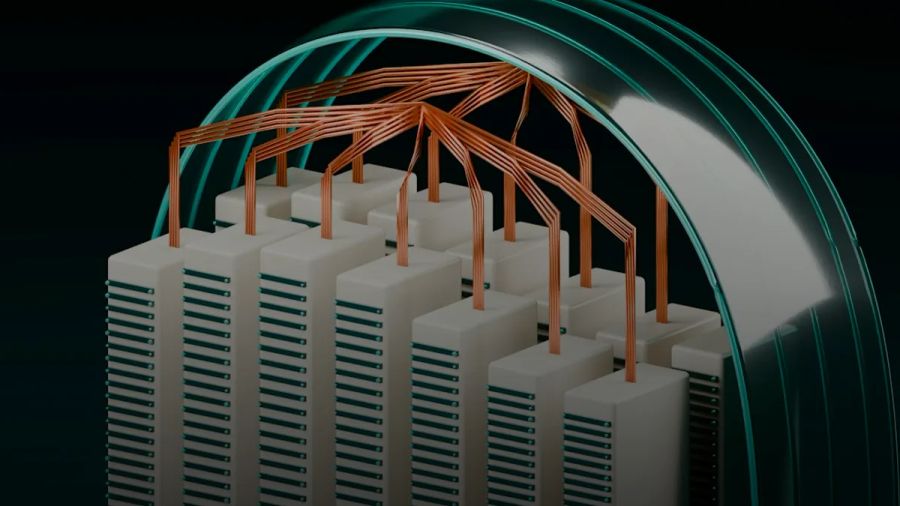
Here is the plain-English version of why it fits on a 12GB card. A traditional dense 125B model runs all 125 billion parameters for every single token it generates. That is what forces you onto data-center hardware. A Mixture-of-Experts model splits those parameters into many small "experts," and for each token a router picks only a handful to actually fire. Qwen3.8-Flash-Next has 512 experts but routes just 10 per token. So the compute cost per word sits closer to a mid-sized model than a 125B one.
Can you really run a 125 billion parameter AI model on a gaming PC? Yes. The weights still live mostly in your system RAM, and Strata streams the handful of active experts onto the GPU as each token needs them. Your 12GB of VRAM holds the always-on layers and the current experts. Your 32-64GB of RAM holds the rest. That division of labor is the entire reason this works.
The architecture has two more clever pieces. It uses a hybrid attention design: linear Gated DeltaNet attention on three of every four layers, with full Qwen Sparse Attention (QSA) on the fourth, which keeps the 262K context from blowing up memory. The practical difference from the cloud Qwen3.8-Flash model is precision. The cloud version runs full-precision on Alibaba's servers. What you run locally is a quantized build, trading some accuracy for a footprint that fits your RAM. Having run these quantized formats across Apple Silicon, NVIDIA, and AMD cards for the benchmark database I maintain at kunalganglani.com/llm-benchmarks, I will say it plainly: quantization quality cliffs are model-family-specific, and a blanket "just use Q4" recommendation is wrong. MoE models behave differently under heavy quantization than the dense Mixtral- and Llama-class models most people have actually tested.
Hardware requirements: GPU, RAM, disk, and OS
The GPU is the part everyone fixates on, and it matters least. Strata officially supports NVIDIA RTX 20/30/40/50-series cards and a wide AMD lineup: RX 7900 XT/XTX, 7800 XT, 7700 XT, 9060 XT, 9070/9070 XT, the Radeon AI PRO R9700, and the RX 6800/6900 series. 12GB of VRAM is the recommended floor. The docs note that 8GB cards "run, slowly," which is refreshingly honest.
RAM is the real gate. You need 32GB minimum, and 64GB to run every quantized size the project ships. This inverts the usual local LLM intuition, where VRAM is king. With an MoE model offloading inactive experts, large system RAM quietly matters more than your card's VRAM. Budget 70-80GB of free disk for the model files, and make sure your CPU supports AVX2, which any chip from the last decade does. The installer handles Python, the venv, and CUDA libraries for you. On NVIDIA you want driver 580 or newer. If you are coming from a smaller setup, my notes on running a 35B model on 16GB cover the same RAM-versus-VRAM tradeoff at a smaller scale.
Which Strata model size should you pick for your RAM?
Strata offers five selectable builds, and the right one is set almost entirely by how much system RAM you have. The quant names (Q2_0, IQ2_XS, IQ3_XXS, IQ3_S) come from the GGUF ecosystem that Georgi Gerganov built with llama.cpp. If you have tuned quantization levels before, they will look familiar.
| Build | Rough RAM tier | What you trade |
|---|---|---|
| Coder | 32GB | Keeps only 256 of 512 experts, code-selected; weaker general knowledge and non-English |
| Q2_0 | 32GB | Smallest general build; most aggressive quantization |
| IQ2_XS | 48GB | Slightly better fidelity than Q2_0 |
| IQ3_XXS | 64GB | Noticeably better quality, larger footprint |
| IQ3_S | 96GB+ | Best local quality, biggest RAM demand |
The Coder build is the interesting one. It strips the model down to 256 experts selected on code data, which is how it squeezes into just 32GB. You lose general-knowledge breadth and multilingual quality, but for a dedicated coding box that is the smart pick. Exact RAM figures shift with the context length you run, so the authoritative numbers live in the project's MODELS.md. If you have 64GB, start with IQ3_XXS. If you have 32GB and want a generalist, start with Q2_0.
Using Strata to run Qwen3.8-Flash-Next: installing on Windows and Linux
The install is genuinely one click, which is the whole selling point. On Windows you download and run strata.exe. The one snag worth knowing in advance: because the executable is unsigned, Windows 11 Smart App Control may block it on first launch, and you will have to allow it manually. On Linux you run the installer script, and it provisions the private Python 3.12 environment and CUDA libraries without touching your system Python.
Once it is up, Strata serves its API on localhost:8080 by default. Point any OpenAI- or Anthropic-compatible client at that port and you are talking to a 125B model running on your desk.
The freshness caveat bites here. If you cloned the repo before October 6, 2026, the git-history rewrite means git pull fails with a confusing error. The fix is a fresh clone. This is exactly the kind of detail that makes week-old tutorials dangerous, and it is why I would bookmark the live INSTALL.md rather than trust any single screenshot of the steps.
AMD vs NVIDIA: setup and driver differences
This is where Strata does something most local AI tooling does not. Almost every CUDA-first project treats AMD as a second-class citizen that demands a painful ROCm install. Strata does not.
| Dimension | NVIDIA | AMD |
|---|---|---|
| Windows driver | GeForce 580+ | Current Adrenalin Edition |
| Linux driver | CUDA libs (installer handles) | Built-in amdgpu kernel driver, no ROCm |
| Supported cards | RTX 20/30/40/50 | RX 7900/7800/7700, 9060/9070, 6800/6900, AI PRO R9700 |
| Multi-GPU | 2-3 cards, layer-split | Single card (per docs) |
| Q2_0 generation | 94 tok/s (RTX 5070) | 60 tok/s (RX 9070 XT) |
The headline for AMD owners: on Linux you need no separate ROCm installation at all, because Strata rides the kernel's built-in amdgpu driver. On Windows, a current Adrenalin Edition driver is the only requirement. For anyone who has lost an afternoon to a broken ROCm toolchain, that is a real simplification. The tradeoff is raw speed and multi-GPU support, both of which still favor NVIDIA.
Real-world performance benchmarks (tokens per second)
Numbers, measured by the maintainer on real consumer hardware:
| GPU | VRAM | Quant | Generation | 32K prompt processing |
|---|---|---|---|---|
| RTX 5070 | 12GB | Q2_0 | 94 tok/s | 2,650 tok/s |
| RX 9070 XT | 16GB | Q2_0 | 60 tok/s | — |
The RTX 5070 test ran on a Ryzen 5 7600 with 64GB of RAM. 94 tokens per second is faster than most people read, and prompt processing at 2,650 tokens per second means a 32K-token context fills in a handful of seconds. The RX 9070 XT's 60 tokens per second is slower but still comfortable for interactive work. The engine keeps improving, too. Version 0.1.36 added fused int8 tensor-core kernels that reportedly lift prompt-processing speed 16-22% on RTX 30-series and newer cards.
What about the budget end? You do not need a current-gen card. Digital Spaceport ran Strata on a roughly $1,000 build using dual RTX 3060s to show how far cheap hardware now stretches. Here is that walkthrough:
If you are weighing whether a build like this beats paying for cloud tokens, run the numbers first. My break-even math on power, idle draw, and depreciation flips the answer depending on how many hours a day the box actually earns its keep. For a direct card-versus-card view, the 24GB showdown between NVIDIA and AMD at the high end holds up here too.
Running Strata across multiple GPUs
Strata can split the model's layers across two or three NVIDIA GPUs using pipeline parallelism, not tensor parallelism. The practical upshot: you do not need NVLink or any peer-to-peer link, and it works even with cards sitting in PCIe x1 or x4 slots. The docs give an example mixing an RTX 5080 with an older RTX 3090, which is exactly the kind of mismatched pair most homelabbers already own.
The community has pushed this well past the official list. Submitted benchmark reports cover dual TITAN RTX 24GB, dual AMD Instinct MI50, paired Intel Arc Pro B60 cards, and even dual Tesla V100s. None of that is officially supported, but it shows how aggressively people are stress-testing the engine on whatever silicon they can scrounge.
Troubleshooting common first-run issues
The single most alarming thing on first launch is not a bug. Your mouse may freeze for several minutes while Strata loads 35-55GB into RAM and probes how much of the model fits on the GPU. The docs flag this as normal. Walk away, get coffee, and it comes back.
The other common snags are quick fixes. Port 8080 conflicts if something else grabbed it, so change the port or free it. On Windows, Smart App Control blocking the unsigned strata.exe needs a manual allow. And the October 6 git-history cleanup breaks git pull on old clones, which a fresh clone solves.
Step back and the stakes get bigger. A 125B model that would have cost you dollars per million tokens in the cloud now runs on the GPU you bought to play games, for the price of electricity. The experimental architecture inside Qwen3.8-Flash-Next is a preview of Qwen4, which means the next time Alibaba ships a frontier open model, the Strata crowd will have it running at home within days, not quarters. If you have been waiting for local AI to be worth the hassle, the hassle just dropped to one click. Clone it this weekend, before the next hotfix rewrites the instructions again.
Photo by Rafael Pol on Unsplash.
Continue reading
10 Self-Hosted AI Tools That Replace SaaS [2026 Tested]
I tested self-hosted AI alternatives across 10 SaaS categories — analytics, transcription, search, vector DB, OCR, translation, CRM, LLM inference, API clients, and bookmarks. Here's what actually saves money and what's not worth the setup.

Qwen 3 vs Mistral 2026: Which Open-Source LLM Family Actually Wins?
Qwen 3 wins for coding, multilingual tasks, and raw benchmark performance; Mistral wins for European compliance, lightweight deployment, and a mature API ecosystem. Here's the full breakdown.
How to Run Qwen 3.8 Flash Next 125B in Strata on RTX 4090 [2026]
A reproducible Strata setup for Qwen 3.8 Flash Next (125B) on RTX 4090, plus the KV cache knobs that decide whether you hit ~100 tok/s or hit OOM.
How to Run Qwen 35B on 16GB VRAM [2026]: Flags + Quants
A reproducible 16GB recipe for “Qwen 35B”: which Qwen2.5-32B quants fit, how to budget KV cache, and the exact serving flags that stop OOMs.

Kunal Ganglani (2026, October 12). Run Qwen3.8-Flash-Next 125B on a Gaming PC [Strata 2026]. Kunal Ganglani. Retrieved October 12, 2026, from https://www.kunalganglani.com/blog/strata-qwen3-flash-next-gaming-pc
Frequently Asked Questions
Is Strata free and open source?
Yes. Strata is released under the permissive MIT license on GitHub, where it has over 22,600 stars. There is no paid tier or license key, and you can read, fork, or modify the entire codebase. The models it runs are also openly available quantized builds of Qwen3.8-Flash-Next.
How much VRAM do I need to run Qwen3.8-Flash-Next with Strata?
12GB of VRAM is the recommended minimum, and 8GB cards work but slowly. VRAM matters less than you would expect here because the model mostly lives in system RAM, so 32GB of RAM is the real floor and 64GB lets you run every size. The GPU only holds the always-on layers and the currently active experts.
Can Strata run across two graphics cards at once?
Yes, on NVIDIA. Strata splits the model's layers across two or three cards using pipeline parallelism. You do not need NVLink or a peer-to-peer link, and it even works with cards in slow PCIe x1 or x4 slots. The docs show mixing different cards, such as an RTX 5080 with an older RTX 3090.
Why does Strata freeze my PC the first time I start it?
This is expected, not a crash. On first launch Strata loads 35 to 55GB of model data into your system RAM and probes how much of it fits on your GPU. That heavy memory activity can freeze your mouse for several minutes. Wait it out and the system becomes responsive again once loading finishes.
What is the difference between Qwen3.8-Flash-Next and the official Qwen3.8-Flash cloud model?
The cloud model runs at full precision on Alibaba's servers. What you run locally through Strata is a quantized build, which compresses the weights so they fit in consumer RAM. You trade some accuracy for the ability to run it at home privately. The architecture is otherwise the same experimental preview of Qwen4.
Is Qwen3.8-Flash-Next good at coding compared to smaller local models?
Strata ships a dedicated Coder build that keeps only 256 of the model's 512 experts, all selected on code data, so it fits in just 32GB of RAM. It trades general knowledge and multilingual ability for a smaller footprint focused on programming. For a coding-only machine it is often the best size to pick.