PhotoCraft: The Vibe-Coded Rust Photo Editor
PhotoCraft is an open-source, pure-Rust photo editor built by 'vibe coding.' Here's what it actually is, how it stacks up against the Rust image ecosystem, and whether it's a real GIMP alternative.

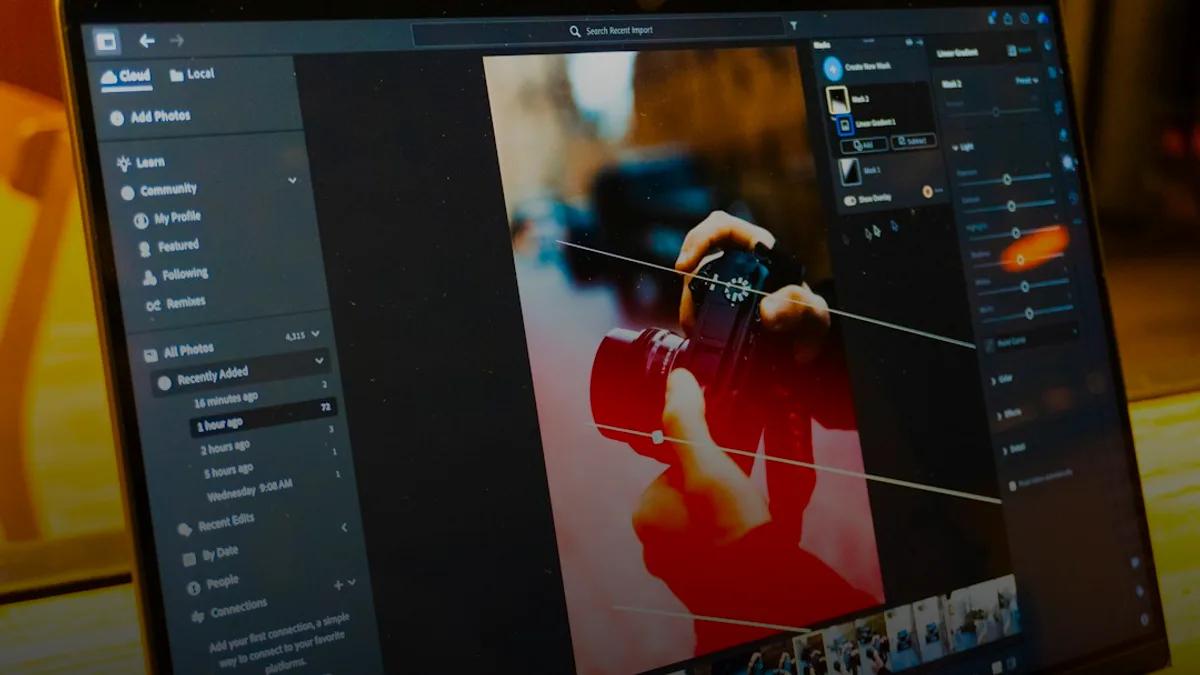
PhotoCraft is an open-source photo editor built from scratch in pure Rust, assembled largely through "vibe coding": describing features in natural language and letting a large language model generate the code. It bills itself as a free Adobe Photoshop alternative, and it shows up right as two big tech stories collide. Memory-safe native creative tools on one side, AI-assisted development on the other. The interesting part isn't the UI. It's what this project tells us about where both trends are actually headed.
PhotoCraft is published on GitHub at storytold/photocraft by the ArtCraft team under MIT or Apache-2.0, and it moves fast: it went from v0.1.0 on October 2 to v0.8.2 on October 12, 2026. This explainer is written against the pure-Rust editor landscape in October 2026. A landscape where the most established player, Oculante, is mid-rewrite and leaving the field wide open.
- PhotoCraft is a from-scratch, pure-Rust desktop photo editor positioned as a free Photoshop/GIMP alternative, and most of its code was generated via AI-assisted "vibe coding."
- Pure Rust is a defensible choice here. The borrow checker gives you memory safety without a garbage collector, and the surrounding ecosystem (image-rs, Photon, egui) is already production-grade.
- The real risk isn't Rust. It's maintainability. A largely AI-generated codebase can be memory-safe and still be a mess no human can safely extend.
- As of October 2026, PhotoCraft is a credible demo and a genuinely useful signal, not yet a Photoshop replacement.
What Is PhotoCraft?
PhotoCraft is a desktop photo editor written entirely in Rust, with no C/C++ core and no Electron shell wrapping a web app. It handles the operations you'd expect from an image editor: crop, resize, filters, adjustments, layers-style editing. And it's distributed as open source. Its pitch, per Kru Mark Tutorials' first-look review, is "a free Photoshop clone."

The claim worth examining is "pure Rust." That phrase means the application logic, the image pipeline, and the UI are all Rust, rather than Rust calling out to a decades-old C library for the heavy lifting. For a photo editor that's a meaningful bar. Image processing is exactly the kind of pointer-heavy, buffer-juggling work where C and C++ historically shipped memory-safety bugs.
A memory-safe language can't save you from an unmaintainable codebase. Rust protects your pointers, not your architecture.
The 'Vibe Coded' Origin Story
"Vibe coding" is the practice of building software by describing what you want in plain English and letting an LLM write the code, accepting and iterating on the output rather than authoring every line by hand. The term was coined by Andrej Karpathy, co-founder of OpenAI, in February 2025. It moved fast enough culturally that Collins English Dictionary named it the 2025 Word of the Year.
PhotoCraft is one of the more ambitious things people have pointed at and said "this was vibe coded." In his first-look video, Kru Mark of Kru Mark Tutorials frames it exactly that way: a free, open-source Photoshop alternative that someone assembled largely through AI-generated code. Here's that review:
I don't say this dismissively. A working, cross-platform image editor is not a to-do app. If an AI-assisted workflow produced something people want to download, that's a real data point about how far vibe coding has come in two years. The question is what you inherit when you ship code that way, which is the whole tension this post is about.
Why Build a Photo Editor in Pure Rust?
The honest answer to "why not C++ or Electron" is three things: memory safety, performance predictability, and distribution.
Memory safety is the headline. Rust's borrow checker enforces that you can't have buffer overflows, use-after-free, or dangling pointers, and it does this at compile time, without a garbage collector pausing your render loop. For a program that spends its life allocating and mutating large pixel buffers, that's not a theoretical nicety. Image decoders are one of the most common sources of memory-corruption CVEs in C libraries. Writing the pipeline in a language that rejects those bugs before the binary exists is a legitimate engineering argument, not marketing.
The Electron question is about resource cost. An Electron photo editor ships a Chromium runtime and does pixel work through JavaScript or WASM bridges. A native Rust app talks to the GPU and memory directly. That said, "native Rust is always faster" is lazy. A benchmark where Rust WASM lost to TypeScript by 25% shows why: bridge overhead and allocation patterns can matter more than raw language speed. I keep seeing the same lesson in the local LLM throughput data I maintain for this site. On Apple Silicon's unified memory, a model that loads fine still bottlenecks on throughput, not capacity. Architecture and memory behavior beat language choice more often than Rust fans admit.
Distribution is the quiet win. A pure-Rust app compiles to a single static-ish binary per platform. No runtime to install, no dependency hell. For an open-source tool hoping volunteers will actually run it, that lowers the barrier a lot. It's the kind of friction reduction worth tracking across the site's dev tools and AI workflow coverage.
PhotoCraft vs. the Pure-Rust Image Ecosystem
Here's the context no video review gives you: PhotoCraft isn't being born into a vacuum. There's a mature pure-Rust image and graphics stack it either builds on or competes with, and knowing the difference tells you whether the project is credible.
| Project | GitHub stars | What it is | Maturity |
|---|---|---|---|
| egui | 31,405 | Immediate-mode GUI framework | Mature; ships an "unsafe forbidden" badge |
| image-rs/image | 5,890 | Image encode/decode crate (PNG, JPEG, WebP, AVIF, TIFF) | Mature; maintained since 2014 |
| Photon | 3,909 | Image-processing library, compiles to WASM | Production-used |
| Oculante | 1,697 | Image viewer/editor with SIMD editing | Maintenance mode; full rewrite in progress |
| PhotoCraft | Early/new | Full photo editor application | First-look stage |
The distinction that matters: image-rs, Photon, and egui are libraries and frameworks. They're the Lego bricks. image-rs/image is the de-facto standard for reading and writing formats, with 5,890 stars and a decade of maintenance behind it. Photon, created by Silvia O'Dwyer, is a 3,909-star image-processing library already running in production AI tooling like the OpenClaw assistant and the Pi coding agent. Concrete proof that pure-Rust image pipelines ship in real products. And Emil Ernerfeldt's egui, at 31,405 stars with an "unsafe forbidden" policy, is the obvious choice for a from-scratch editor's UI.
PhotoCraft is an application. The smart move for any from-scratch Rust editor is to stand on those bricks rather than reinvent JPEG decoding. If PhotoCraft wires image-rs and egui together into a coherent editor, that's exactly how you'd want it built. If it reimplemented all of it from zero via prompts, that's where I'd start worrying about duplication and bugs.
One genuine opening: Oculante, maintained by woelper, is the closest existing Rust editor. 1,697 stars, SIMD-accelerated non-destructive crop, resize, paint, rotate, and blur. It's currently in maintenance mode while the team works on a full rewrite. That pause is precisely the gap a new project can step into.
PhotoCraft vs. GIMP: How It Compares
This is the comparison people actually type, so let's be blunt. GIMP has been shipping since 1998. It has layers, masks, a scripting engine (Script-Fu and Python-Fu), a plugin ecosystem, 30-bit color support in the 3.0 line, and millions of users who've stress-tested every edge case. PhotoCraft is an early-alpha project that shipped v0.1.0 on October 2, 2026, and has put out more than a dozen releases since.
On features, it isn't close yet. GIMP wins on breadth, format support, non-destructive workflows, and sheer battle-testing.
Where a PhotoCraft-style project can win over time is the things GIMP carries as legacy weight: a modern, GPU-aware architecture, a clean single-binary install, a UI that isn't 25 years of accumulated menus, and memory safety baked into the core instead of bolted onto a C codebase. GIMP's own slow pace is telling. The jump from 2.10 to 3.0 took years, and that's exactly why people keep trying to build fresh alternatives.
My take: judging PhotoCraft against GIMP today is a category error. It's a 2026-born project versus a 28-year-old institution. The fair question is whether PhotoCraft's foundation is good enough that it could close the gap in a few years. Pure Rust plus the existing ecosystem says the foundation is plausible. The vibe-coded origin is what makes the "few years" part uncertain.
Features, Limitations, and the Maintainability Problem
The feature set, based on available coverage, covers the core editor loop: open and save common formats, crop and resize, filters and adjustments, and basic layered editing. That's enough to be useful for quick edits. It is not enough to replace a professional tool, and nobody should pretend otherwise.
The long-tail search "photocraft vectorcraft" has a simple explanation: VectorCraft is a sibling vector-illustration app from the same ArtCraft team. Both belong to the team's "Crafting Apps," free, open-source creative tools each written from scratch in Rust, and as of October 2026 getartcraft.com lists VectorCraft as "In development" and PhotoCraft as "Early alpha." That points at an ambition to build a whole free creative suite, which is a far bigger undertaking than one editor.
Now the limitation that actually matters, and the one a short video can't cover: a largely AI-generated codebase can be perfectly memory-safe and still be a maintenance liability. Rust's compiler guarantees you won't segfault. It guarantees nothing about whether the architecture is coherent, whether the abstractions are consistent, or whether a human contributor can safely extend it six months from now.
This is the exact tension I keep running into. Building this blog's seven-agent publishing pipeline taught me that deterministic checks before LLM review catch more than doubling the review model's size. The model is confident, not correct, and without hard gates you accumulate subtle debt fast. A recurring pattern in security audits of vibe-coded applications isn't crashes. It's inconsistent patterns, duplicated logic, and security assumptions nobody actually verified. A photo editor that loads untrusted image files is a real AI security surface, and "the compiler said it was fine" doesn't audit the decode paths.
So PhotoCraft gets the memory-safety win for free from Rust. It does not get code review for free, and that's the part that determines whether it survives past the demo.
Getting Started: Installing and Trying PhotoCraft
Because PhotoCraft is early and open source, the path to trying it is the standard Rust open-source flow:
- Find the repository. The canonical repo is github.com/storytold/photocraft, published by the ArtCraft team under MIT or Apache-2.0. Use it rather than a mirror.
- Check for release binaries. The friendliest option is a prebuilt binary for your OS on the GitHub Releases page. Download, run, done.
- Or build from source. If there's no binary for your platform, install the Rust toolchain via
rustup, clone the repo, and runcargo build --release. - Read the README first. Confirm which image formats and features are actually implemented today versus planned. Early projects move fast and docs lag.
- Expect rough edges. This is first-look software. Don't point it at your only copy of an irreplaceable file.
If you want to understand the kind of project this is before downloading, the pattern mirrors other from-scratch Rust clones like WordCraft, the open-source Word alternative: ambitious, native, and early. For the broader toolchain context, our Dev Tools & AI Workflow hub covers how these AI-assisted projects get built and maintained.
Is PhotoCraft Worth Using Today?
For production work, no. Use GIMP, Krita, or Photoshop. PhotoCraft doesn't have the feature depth, the format coverage, or the track record, and it won't for a while.
For curiosity, experimentation, and supporting a promising open-source project, yes. It's a genuinely interesting artifact: a native, memory-safe, from-scratch image editor that shows how far AI-assisted development has pushed what a small effort can produce. If you care about the pure-Rust creative-tools movement, it's worth a clone and a build.
The pattern I'd watch is whether PhotoCraft transitions from vibe-coded prototype to human-stewarded project. Real contributors, real code review, real issue triage. That's the fork in the road. The projects that make it treat AI as the first draft and humans as the editors. The ones that don't become exactly the tech-debt case studies the industry is already writing about, right alongside every other AI in production lesson we're learning the expensive way.
My prediction: within 18 months we'll see a wave of these "vibe-coded native app" clones, and the handful that survive won't be the ones with the slickest first-look video. They'll be the ones where a maintainer sat down, read every line the model wrote, and decided which half to throw away. Rust will have kept them from crashing. Humans will have kept them alive. The same discipline applies whether you're shipping a photo editor or wiring up Claude Code on your own repo. The tool writes fast, but you still own the result.
Photo by Zulfugar Karimov on Unsplash.
Continue reading
WordCraft: An Open-Source Rust Clone of Microsoft Word
WordCraft is a four-day-old, open-source clean-room reimplementation of Microsoft Word written in Rust. Here's what it is, why it's not Google's Wordcraft, and what 40 years of clean-room clones say about its odds.

Vibe Coding vs Agentic Coding: 2026 Decision Guide
Vibe coding is fast and low-structure. Agentic coding is planned and tool-using. Here's a scoring rubric for which one wins on your actual project.
Vibe Coding vs Agentic Coding: 2026 Decision Guide
Vibe coding is prompt-and-pray with no review. Agentic coding is planned, tool-using, and reviewed. Here's the real technical line and a decision framework for when each one belongs on your team.
Inkling-2-Mini Local AI Model Benchmark: 5.4GB vs 27B
A 5.4GB open-weight model claiming to beat Qwen 3.8 27B on coding and reasoning. Here's what the Inkling-2-Mini benchmark claims actually hold up to, the architecture that could explain it, and how to run it locally.

Kunal Ganglani (2026, October 14). PhotoCraft: The Vibe-Coded Rust Photo Editor. Kunal Ganglani. Retrieved November 27, 2026, from https://www.kunalganglani.com/blog/photocraft-rust-photo-editor
Frequently Asked Questions
Is PhotoCraft's source code available on GitHub?
Yes. The ArtCraft team maintains it in the storytold/photocraft repository on GitHub, and you can use the code under either the MIT or the Apache-2.0 license. Check its Releases page for prebuilt binaries, or build it yourself with cargo.
What is VectorCraft and how does it relate to PhotoCraft?
It's the ArtCraft team's vector-drawing app, a companion to PhotoCraft. Both are free, open-source "Crafting Apps" written from scratch in Rust. The team's site, getartcraft.com, showed VectorCraft as still in development and PhotoCraft as an early alpha in October 2026.
How does PhotoCraft compare to GIMP?
GIMP wins decisively today on features, format support, scripting, and 28 years of battle-testing. PhotoCraft's advantages are structural: a modern pure-Rust core, memory safety, and a clean single-binary install without GIMP's legacy baggage. It's an early project, not a current replacement for GIMP.
What does 'vibe coded' mean, and was PhotoCraft really built this way?
Vibe coding means building software by describing it in natural language and letting an AI model generate the code, a term Andrej Karpathy coined in February 2025. According to Kru Mark Tutorials' first-look review, PhotoCraft was assembled largely through this AI-assisted workflow rather than written line by line.
Why build a photo editor in pure Rust instead of C++ or Electron?
Rust's borrow checker prevents buffer overflows and dangling pointers at compile time with no garbage collector, which matters for the pixel-buffer work a photo editor does constantly. Compared to Electron, a native Rust app avoids shipping a Chromium runtime and compiles to a single distributable binary.
What are the risks of a largely AI-generated codebase for a desktop app?
The main risk isn't crashes — Rust prevents memory bugs regardless of who wrote the code. It's maintainability: AI-generated code can be inconsistent, duplicated, and full of unverified assumptions, making it hard for human contributors to safely extend. Projects survive when humans review and refactor the AI's output instead of shipping it as-is.